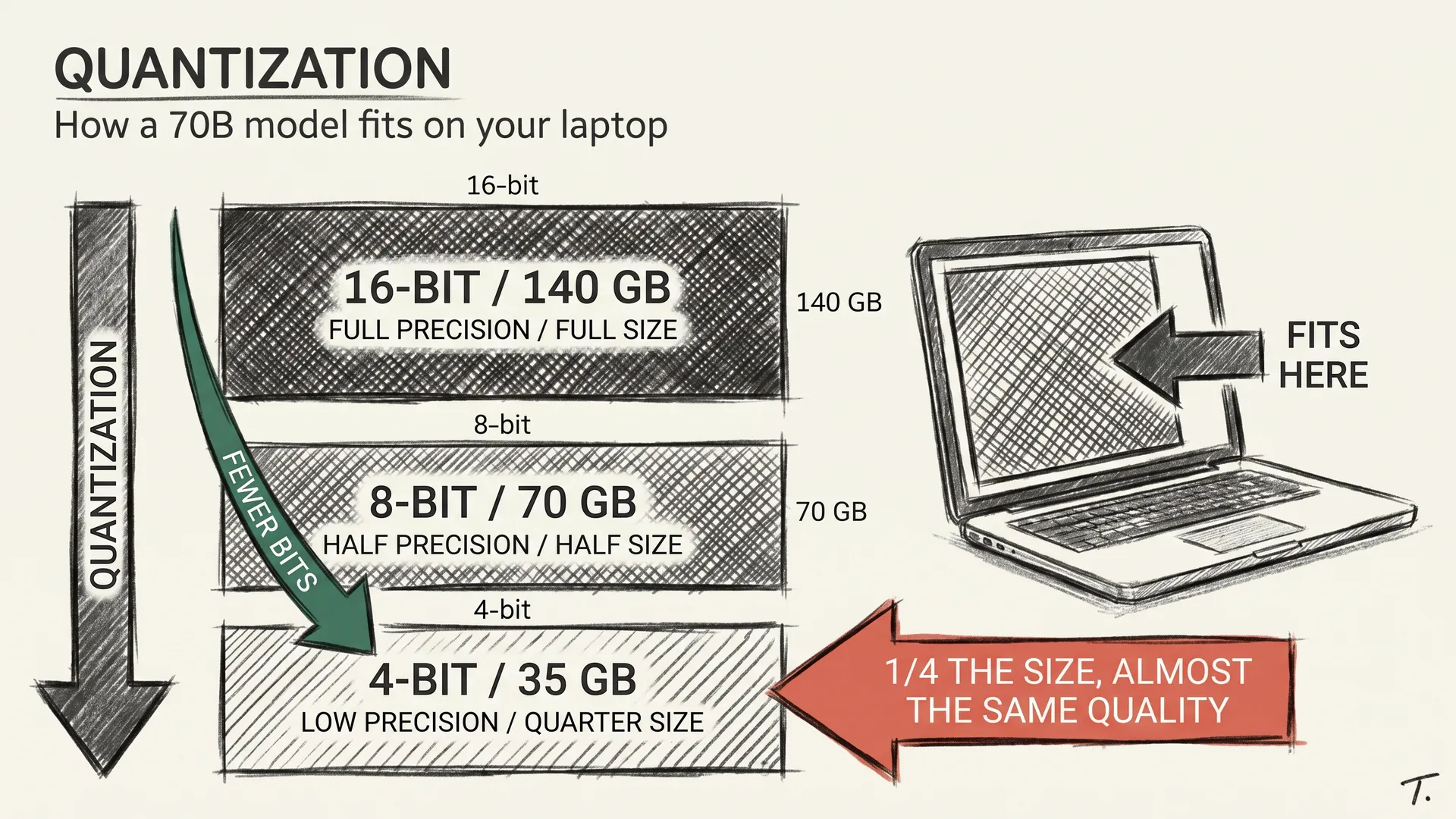
The previous article on quantization ended with a model that fits. A 70B at 4-bit is around 40 GB on disk. The next obvious question is what you actually run it with. So let me answer that one.
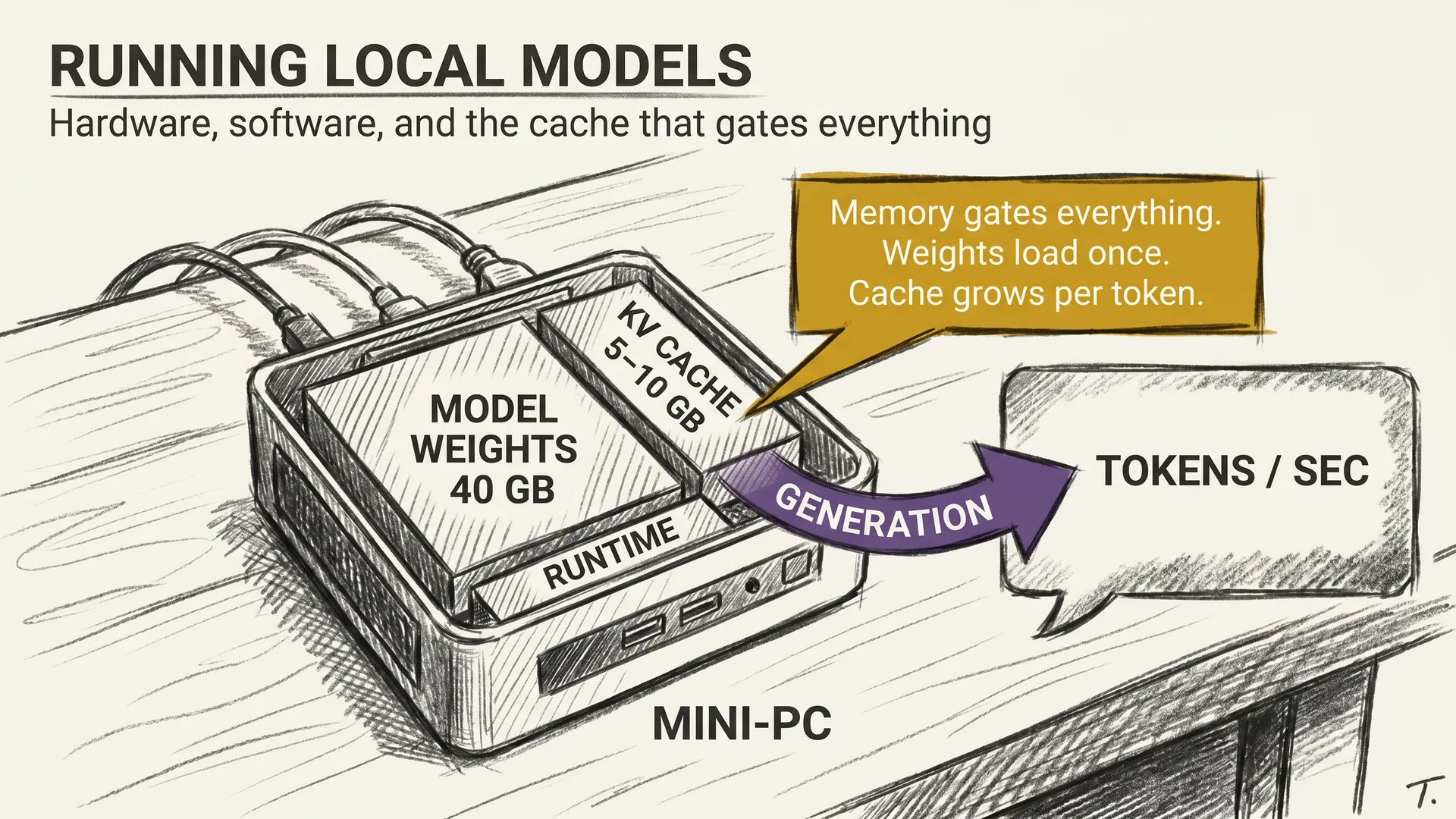
By 2026 four pieces of software handle nearly every local model that gets pulled off Hugging Face. They have different goals, but they all share the same job. Load the weights, manage the cache, produce tokens. The choice between them is less interesting than the constraint that ties them together, which is the memory you have.
THE STACK
The first piece of software you meet is llama.cpp. It is the original CPU-and-everywhere engine, written in pure C++, with no Python and no CUDA dependency unless you opt in. Its file format, GGUF, is the lingua franca of consumer local AI.
If your code path needs to run on a Mac with no GPU at all, this is the only option that does not make you sad.
The second is Ollama, a friendly wrapper around llama.cpp with two real features. A model library that hides Hugging Face complexity behind one command, and a stable local HTTP server on port 11434 that speaks roughly the OpenAI API.
You install Ollama, you run ollama run llama3.3, you connect any tool that talks to the OpenAI API, and it works. The trade is that you give up some control over sampling and quantization variants.
The third is LM Studio, a desktop GUI on top of the same llama.cpp engine, with model browsing, prompt testing, and a server tab. I use it for quick “does this model do X” tests, where command-line friction would slow me down. The GUI is also where most non-engineers should start.
The fourth is vLLM. This is the serious-throughput engine, built for Nvidia GPUs and aimed at serving many concurrent users with low latency.
If you are running a small product, vLLM is the back end. If you are running a chat assistant for yourself, it is overkill.
There are others, TGI and MLC and ExLlamaV2, but those four cover the ground from laptop to small server.
THE HARDWARE TIERS
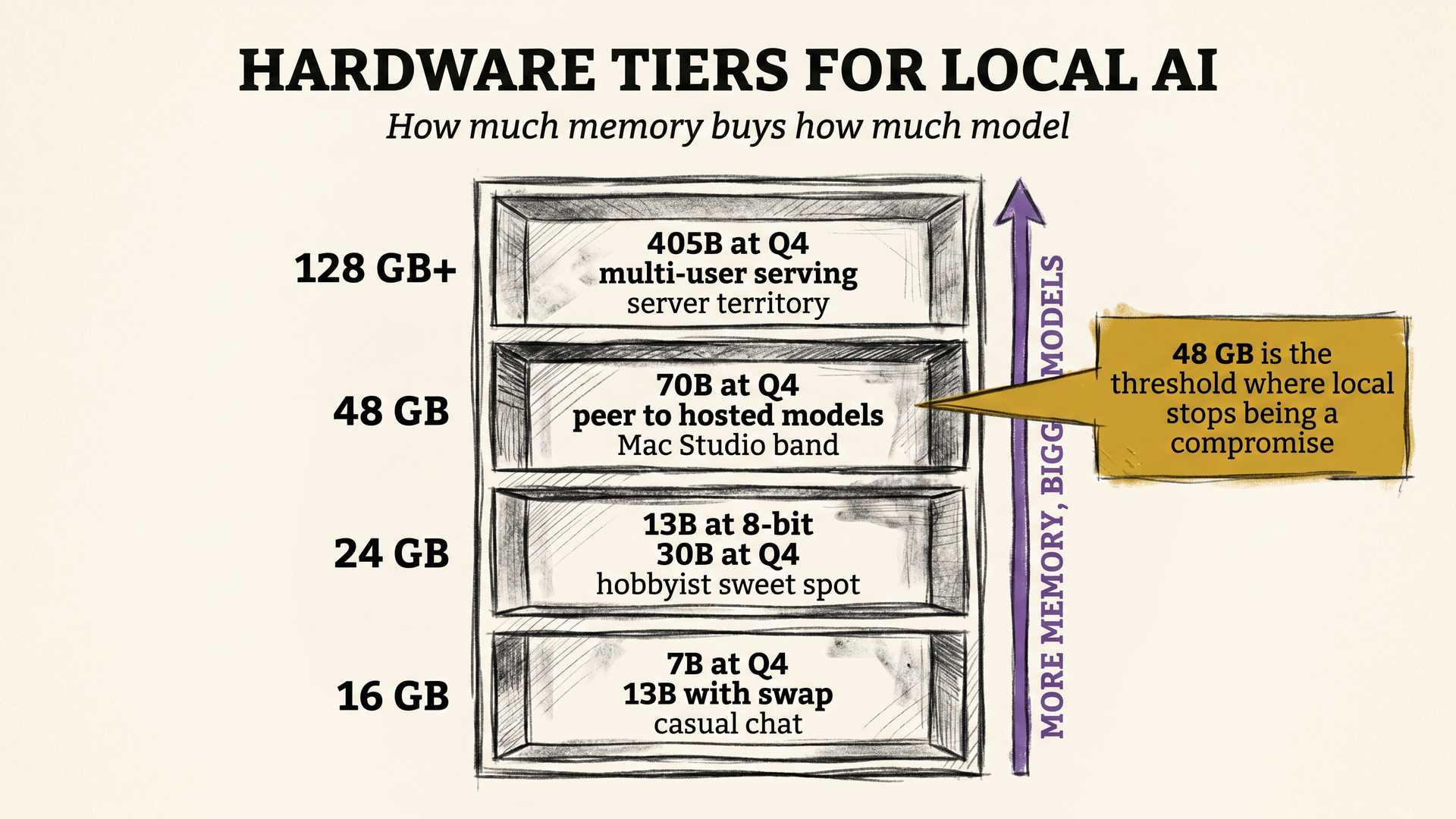
The cleanest way to think about local hardware in 2026 is in four memory tiers, because memory is what gates which models you can load.
At 16 GB, you can run a 7B model comfortably at 4-bit, or push to 13B if you accept some swap. This tier is most consumer laptops. The experience is fine for coding assist, summarization, and short chat. You will not run a reasoning model that thinks for two minutes here.
At 24 GB, a single RTX 4090 or 5090, a 13B in 8-bit and a 30B in 4-bit fit. This is the sweet spot for hobbyists. It is also where vLLM starts to matter, because you can serve a small team off one card.
At 48 GB, either two consumer cards or one workstation card, you can hold a 70B at 4-bit. This is the tier where local AI stops feeling like a compromise and starts feeling like a peer to hosted models. Mac Studio with unified memory belongs in this band too. 64 to 96 GB of unified memory is enough to run 70B locally on Apple silicon.
At 128 GB and above, you reach the regime where a 405B quantized model fits, or a 70B serves many users at once. Workstation territory, or a small server. The dollar number here gets serious, but so does the capability.
My own daily local box is a K12 mini-PC with 64 GB of RAM, sitting under the desk. It is not a Mac Studio, not a workstation, just a small box that costs less than a flagship phone, draws about 60 watts at full tilt, and runs a 70B at 4-bit at usable speed. Two years ago that sentence would have read as fiction.
THE KV CACHE PROBLEM
Here is a detail most beginners miss. Loading the model into memory is the obvious cost. The less obvious one is the cache that grows while the model thinks.
When the model reads your prompt, it computes intermediate vectors at every layer and stores them. These stored vectors are the KV cache, short for keys and values. The cache lets the model avoid recomputing the entire prompt on every new token. The trade is memory.
A 70B model serving one user at 8K context uses roughly 5 to 10 GB of KV cache, on top of the 40 GB of weights. At 32K context the cache balloons to four times that. At 128K it can exceed the size of the model itself.
This is why a model that loads fine on your machine can still run out of memory at long context. Max context numbers on a spec sheet are not the same as max model size in practice.
vLLM’s PagedAttention is the standout fix here. It treats the cache like virtual memory in an operating system. Small fixed-size pages, allocated only when needed, instead of reserving worst-case memory upfront. Without it, every request would have to assume the longest possible context, which kills the number of users a card can serve.
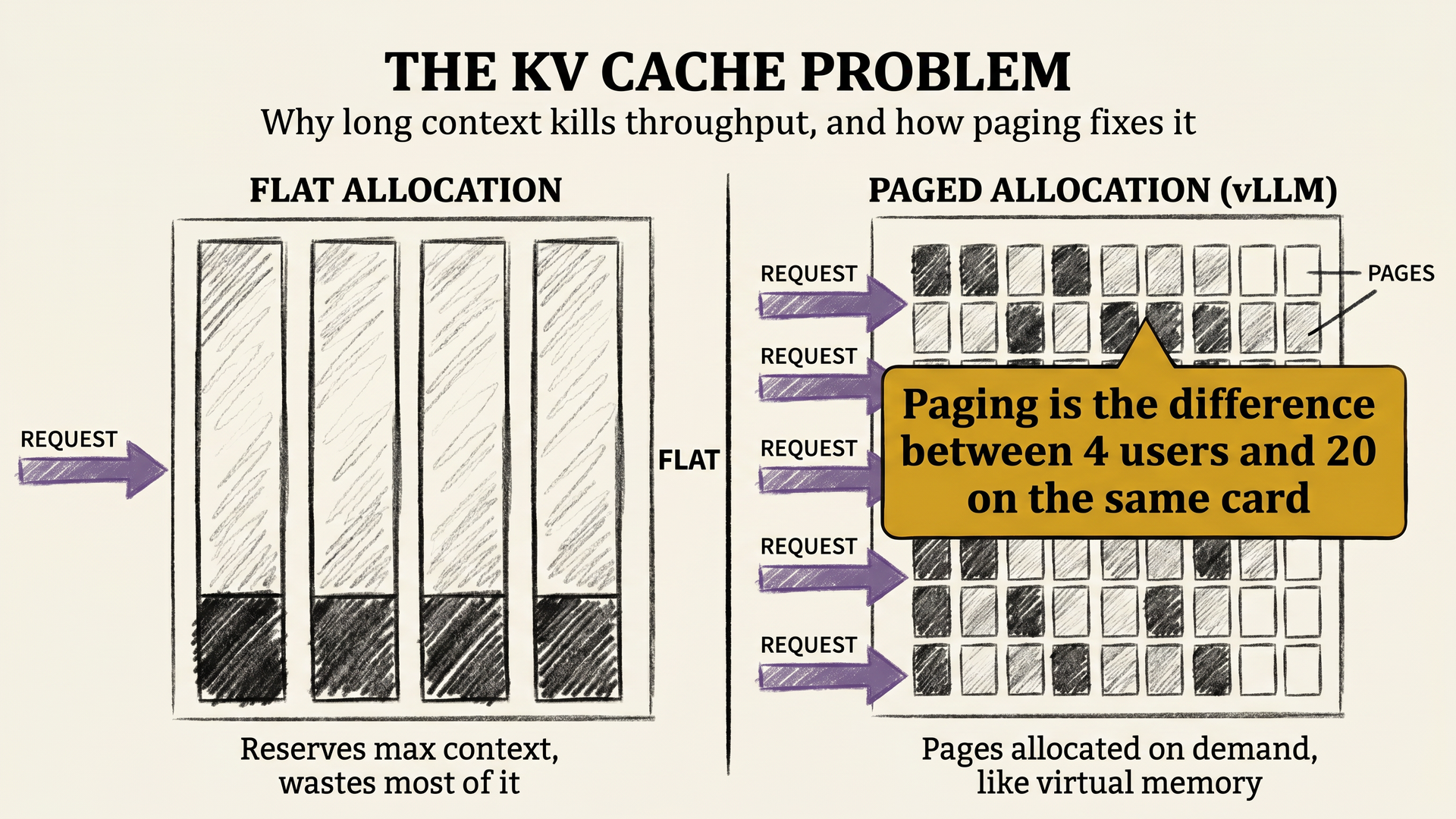
For one person on a laptop, this matters less. For a server, it is the difference between four concurrent users and twenty.
THE MONDAY MORNING SETUP
The fastest way from zero to a working local model on most systems looks like this. Install Ollama. Pull a model. Talk to it.
curl -fsSL https://ollama.com/install.sh | sh
ollama pull llama3.3
ollama run llama3.3
Three commands, two minutes if your internet is fast. On a Mac the same flow works through the Ollama GUI installer. On a Linux mini-PC like my K12, the script above is the entire setup.
The follow-up question most people ask is which model to pull. The honest 2026 default for a 16 to 24 GB machine is Llama 3.3 8B at Q4 for general use, Qwen 3 14B at Q4 for coding, and a small reasoning model like a DeepSeek R1 distill for thinking tasks. For 48 GB and up, swap in the 70B variants of the same families.
The most underrated tip is that you should not start with the biggest model that fits. Run the smallest one that gives good answers, see if it covers your real tasks, and only climb the size ladder when the small one fails. Most people overshoot, then spend their evening watching tokens drip out at one per second.
THE PRACTICAL TAKEAWAY
A useful 2026 summary of local AI looks like this. For a laptop, install Ollama and pull a 7B. For a hobbyist desktop with one good card, install Ollama plus LM Studio, and run a 13B to 30B.
For a workstation or mini-PC with 48 GB and up, you are running a 70B at usable speed and can start to think of this as your primary AI, not a backup. For a server, learn vLLM. The decision tree is mostly memory.
The other thing worth saying is that the setup is not a one-time event. New models drop every other week, and the half-life of “best model that fits your hardware” is now about three months. Make the install process boring and repeatable, because you will rerun it.
Honestly, this is the part of the LLM story I find most exciting. The frontier you read about in papers is one thing. The model running quietly under your desk, costing pennies in electricity, answering you in two seconds, is another. Both matter, and only one of them is yours.
The series next steps go in the human-facing direction. The next article looks at Personal AI Infrastructure as a category, why anyone would run their own AI instead of using a hosted one, and what changed in 2026 that finally made it possible.
T.
References
- llama.cpp - The CPU-first inference engine and source of the GGUF format used by Ollama, LM Studio, and most consumer-facing local model distribution.
- Ollama - The OpenAI-API-compatible local server that wraps llama.cpp and made local model installation a single shell command on macOS, Linux, and Windows.
- vLLM project - The high-throughput serving engine for Nvidia GPUs, with the PagedAttention cache layout that changed the economics of serving many users from one card.
- Efficient Memory Management for Large Language Model Serving with PagedAttention (Kwon et al., 2023) - The paper that introduced the paged KV cache approach used by vLLM and adopted by most modern inference stacks.
- LM Studio - The desktop GUI for local model browsing and testing, useful as an on-ramp before committing to a server-style stack.