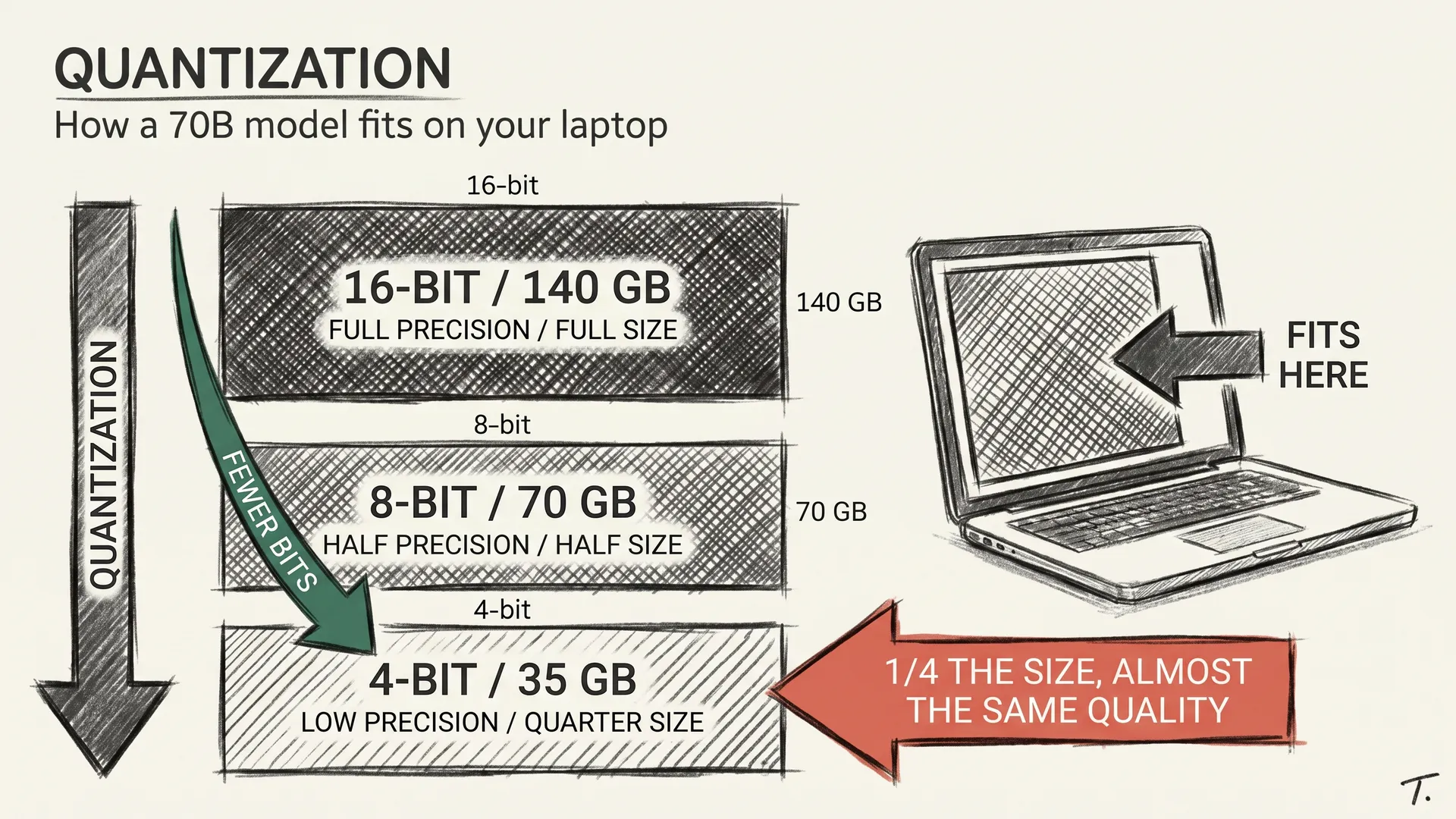
A 70B model in its native form takes 140 GB. No consumer GPU has that, not even the high-end ones. So how can I run a 70B model on a workstation under my desk, and smaller ones on the laptop I am typing this on?
The answer is quantization, and it is one of the most useful tricks in modern AI. The previous article on fine-tuning leaned on it for QLoRA without stopping to explain it. This one stops to explain it.
WHAT QUANTIZATION ACTUALLY DOES
Every weight in a neural network is a number. By default, the model keeps each one in 16 bits: 65,536 possible values per weight.
Quantization swaps those 16 bits for fewer: 8 bits gives you 256 possible values, 4 bits gives you 16, 2 bits gives you 4. The file shrinks in direct proportion. Half at 8-bit, a quarter at 4-bit, an eighth at 2-bit.
That is the whole trick. Pick fewer bits per weight, accept the quality loss that comes with it.
The intuition I find useful is JPEG compression. A 30 MB raw photo saved as a 3 MB JPEG looks identical to most viewers; push it to 300 KB and the loss shows up as blocky skies. The picture stays recognizable, but the fidelity is gone.
WHY THIS WORKS AT ALL
The natural question is whether throwing away bits ruins the model. The honest answer is almost not at all, until it does.
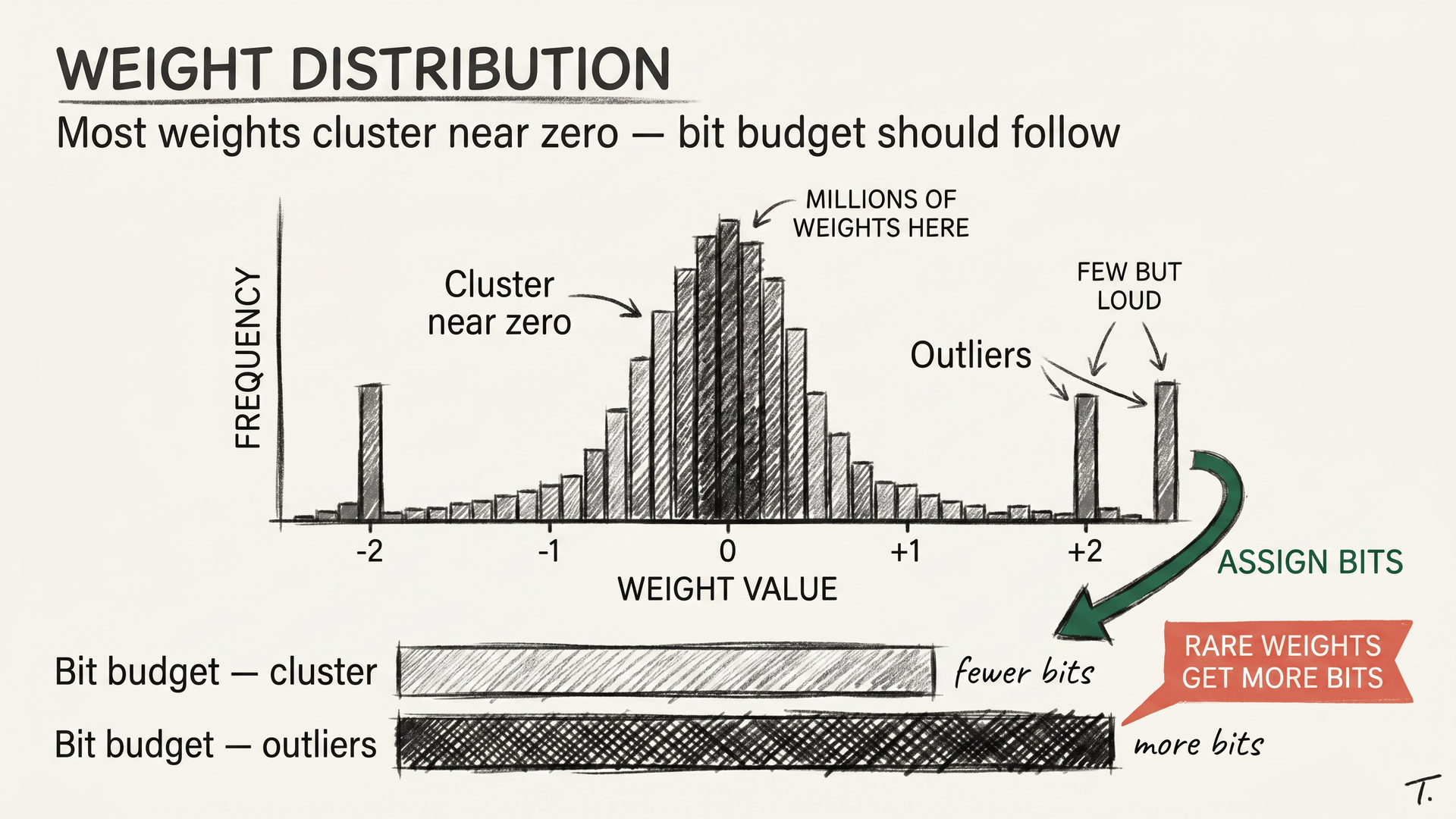
Most weights in a trained neural network cluster near zero. The vast majority of precision in a 16-bit number goes into representing tiny differences the model is largely indifferent to. Keep more bits for the rare large weights, fewer for the common small ones, and you can usually halve precision without changing what the model does.
This is what modern quantization methods exploit. They study the actual distribution of weights, decide which matter more, and assign bits accordingly. The naive approach truncates every weight uniformly and pays for it in quality; the smart approach does not.
There is also a detail that matters more than it looks. Activations, the intermediate numbers the model computes during inference, sometimes spike to very large values in specific layers. Schemes that handle these outlier activations well, like AWQ and SmoothQuant, hold up far better at low bit depths than schemes that do not. Think of activations like potholes on a smooth road: the road feels fine until one of them swallows your tire.
THE FORMAT WARS
By 2026 three families of quantization format matter.
The first is GGUF, the format from the llama.cpp project. GGUF runs almost anywhere, including on plain CPUs without a GPU, the way MP3 once ran on every device with a chip. The names you see on Hugging Face (Q4_K_M, Q5_K_S, Q8_0) describe the bit depth and the exact scheme.
The second family is GPU-first, optimized for fast inference on Nvidia hardware. AWQ, GPTQ, and EXL2 sit here. They take more setup but run two to three times faster than GGUF on the same card at low bit depth.
The third is whatever the frontier labs ship privately. Anthropic, OpenAI, and Google all quantize the models they serve, but they keep the recipe to themselves. As a user you never need to think about it; your token bill is the only signal that matters.
For running models at home, the choice is mostly GGUF (universal, slightly slower) versus AWQ or EXL2 (Nvidia-only, faster). Both fit a 70B into one workstation. Pick by hardware, not by religion.
THE QUALITY CLIFF
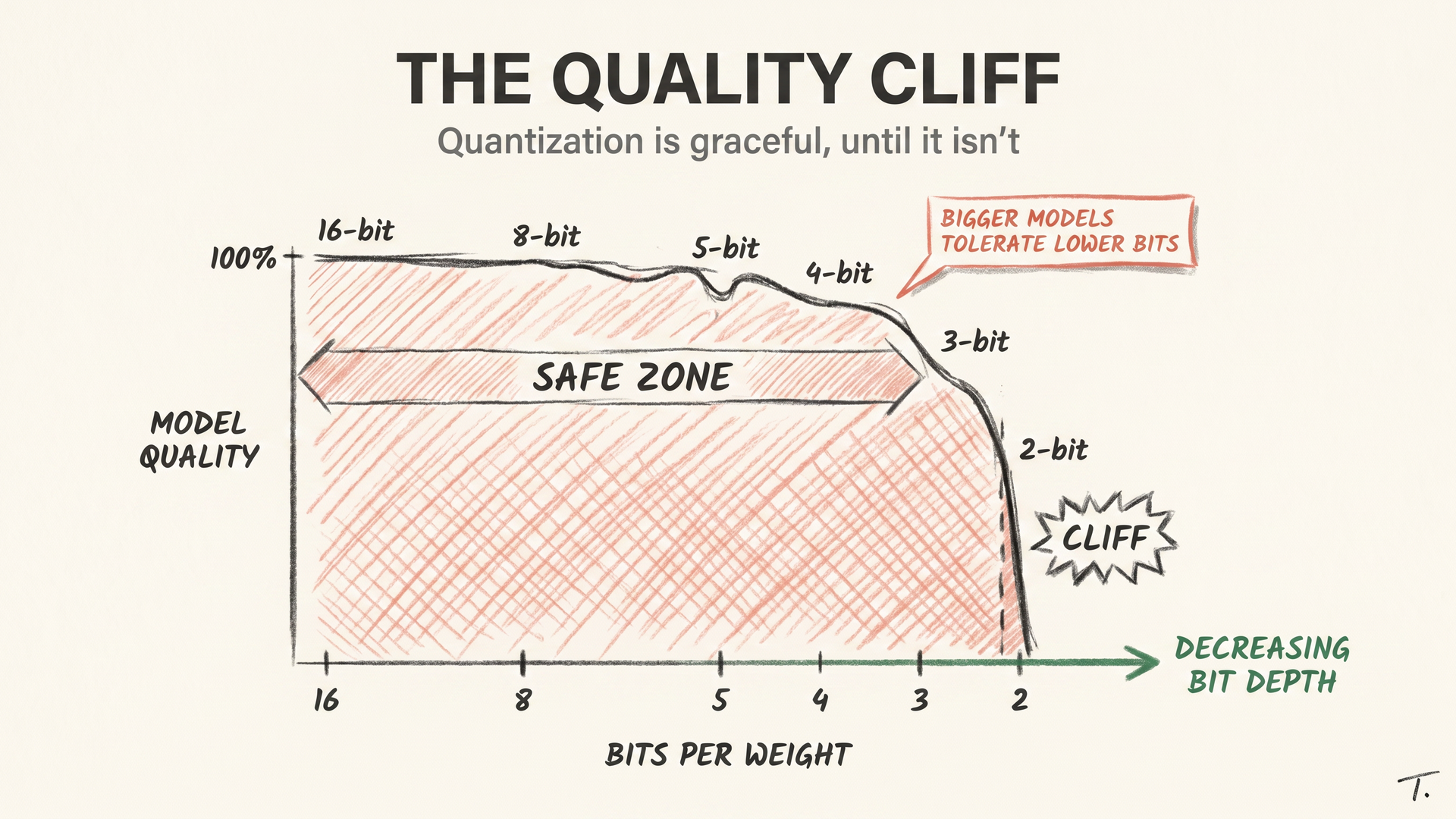
Quantization is graceful until it isn’t.
At 8-bit, you should not be able to measure a difference on most tasks. At 5–6 bits, small dips show up on long-context reasoning and code. At 3-bit, the model feels noticeably less coherent on hard problems. At 2-bit, you are in a regime where the model still works but is clearly degraded, and which scheme you used starts to matter more than the bit count.
The cliff is also model-dependent, which surprises people. Larger models tolerate quantization better. A 70B at 4-bit is often almost indistinguishable from the same model at 16-bit, while a 7B at 4-bit shows the loss more clearly. Bigger models behave like a thick rope: lose a few strands and it still holds; do the same to a thin one and it snaps.
The other surprise is which tasks degrade first. Casual chat barely moves, while code and math show the biggest drops. Multilingual performance, especially in lower-resource languages, takes an outsized hit. If your application leans on any of those, do not just grab the smallest version and hope.
THE NUMBERS YOU CAN ACT ON
This is the part that lets you decide what to download tonight.
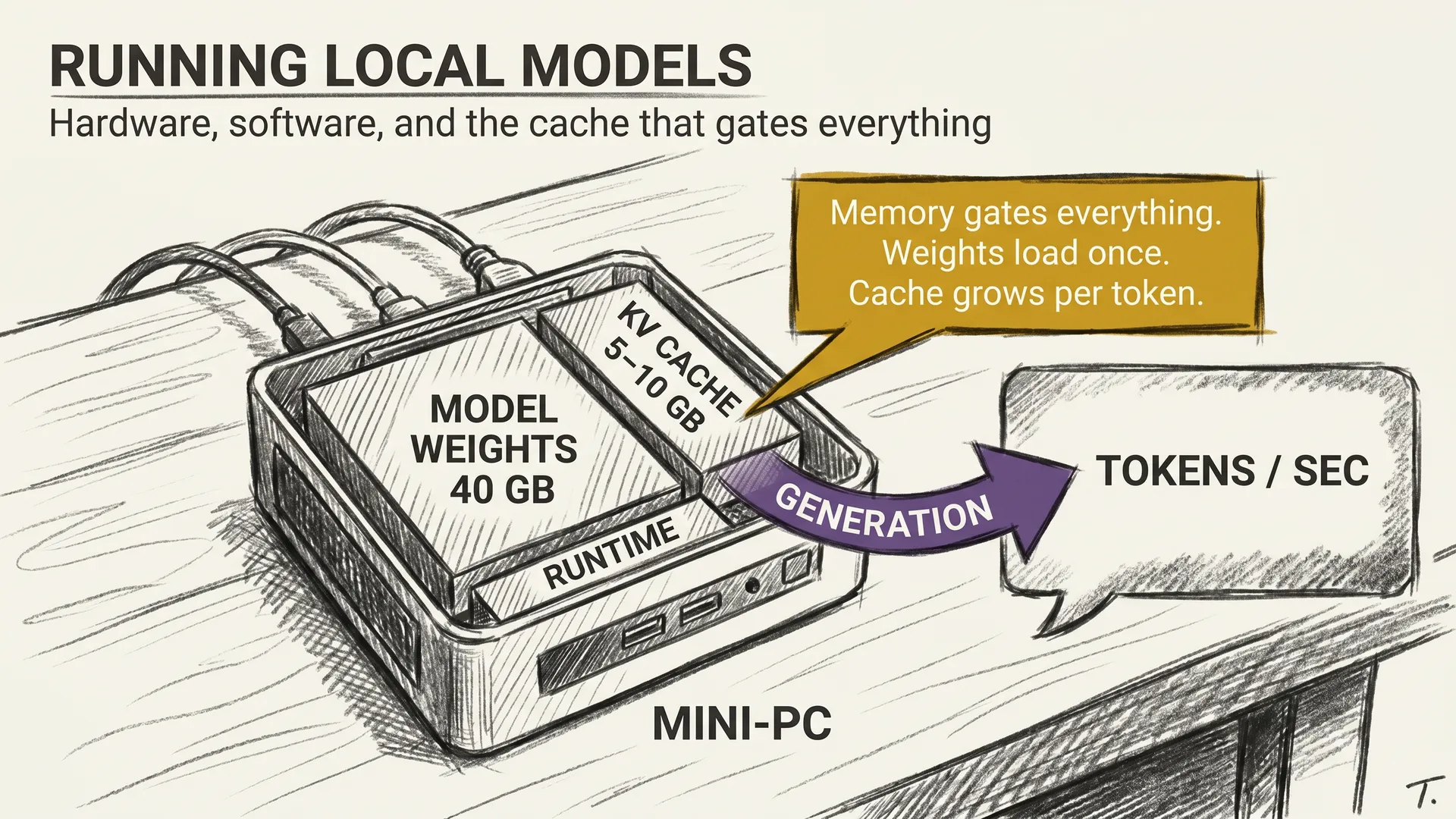
A 7B model at 4-bit is around 4 GB. That fits on basically any modern laptop with 8 GB of RAM, no GPU required. A 13B at 4-bit is around 8 GB and runs comfortably on a 16 GB Mac. A 70B at 4-bit is around 40 GB, which fits on a single workstation card with 48 GB or a Mac Studio with enough unified memory.
A 405B at 4-bit, the largest open-weight class in 2026, lands around 220 GB and still needs serious workstation hardware. But it lands, and that was unthinkable two years ago.
The cost story is simpler than people expect. Cloud inference charges by the million tokens; a model you run yourself charges you in electricity. A quantized 70B serving one user draws roughly the power of a small space heater. Run it a few hours a day and the bill disappears into the rest of the house.
THE PRACTICAL TAKEAWAY
The honest rule of thumb in 2026: start with the 4-bit quantization of the largest model that fits in your memory, and only climb to the 5–8 bit range if you can measure a difference on tasks you actually care about. For most readers that means Q4_K_M GGUF on CPU and Mac, AWQ-4bit or EXL2 at 4 bpw on Nvidia. Think of it like buying a camera: you want the biggest sensor that fits the budget, not the highest megapixel count.
If you are shipping a product on top of this, run your own evals at multiple bit depths before committing. The right answer depends on how much your app leans on code, math, or multilingual output. Trusting the average Hugging Face benchmark is a faster way to ship a regression than a feature.
A small note: reputable quantization releases ship paired with an eval. Look at it before production, and treat its absence as a signal in itself.
Quantization is the bridge between the frontier models you read about and the ones you can run. Without it, local AI would still be theoretical. With it, the laptop on my desk runs a model that would have needed a small data center in 2022. That is the part of this story I find most underrated.
The next article picks up exactly that thread. We have shown how to shrink the model. Now we ask, what does it take to actually run one, on hardware you own?
T.
References
- GPTQ: Accurate Post-Training Quantization for Generative Pre-trained Transformers (Frantar et al., 2022) - The post-training quantization method that made 4-bit inference viable on large models without retraining.
- AWQ: Activation-aware Weight Quantization (Lin et al., 2023) - The paper that argued protecting outlier activations matters more than the weights themselves, now one of the fastest GPU formats.
- llama.cpp and the GGUF Format - The reference implementation for CPU and cross-platform inference, and the source of the GGUF naming conventions you see on Hugging Face.
- QLoRA (Dettmers et al., 2023) - The paper that combined 4-bit quantization with LoRA adapters and made fine-tuning of 70B models possible on a single workstation.
- A Survey on Quantization Methods for Efficient Neural Network Inference (Gholami et al., 2021) - A solid academic overview of the broader quantization field, useful for anyone who wants to go deeper than this article.